Ask Lume: AI for your practice
Ask Lume is AI for your practice. Type a question in plain words and it answers from your own data, with a table or a chart. Top Brands can now show every brand you sold.
Ask Lume: AI for your practice
Headquarters has a new tab called Ask Lume. It is AI, and it knows your practice. Type a question the way you would ask a coworker. Which frames sold best last month? How many customers are due for a recall? What did our sales look like on Saturdays?
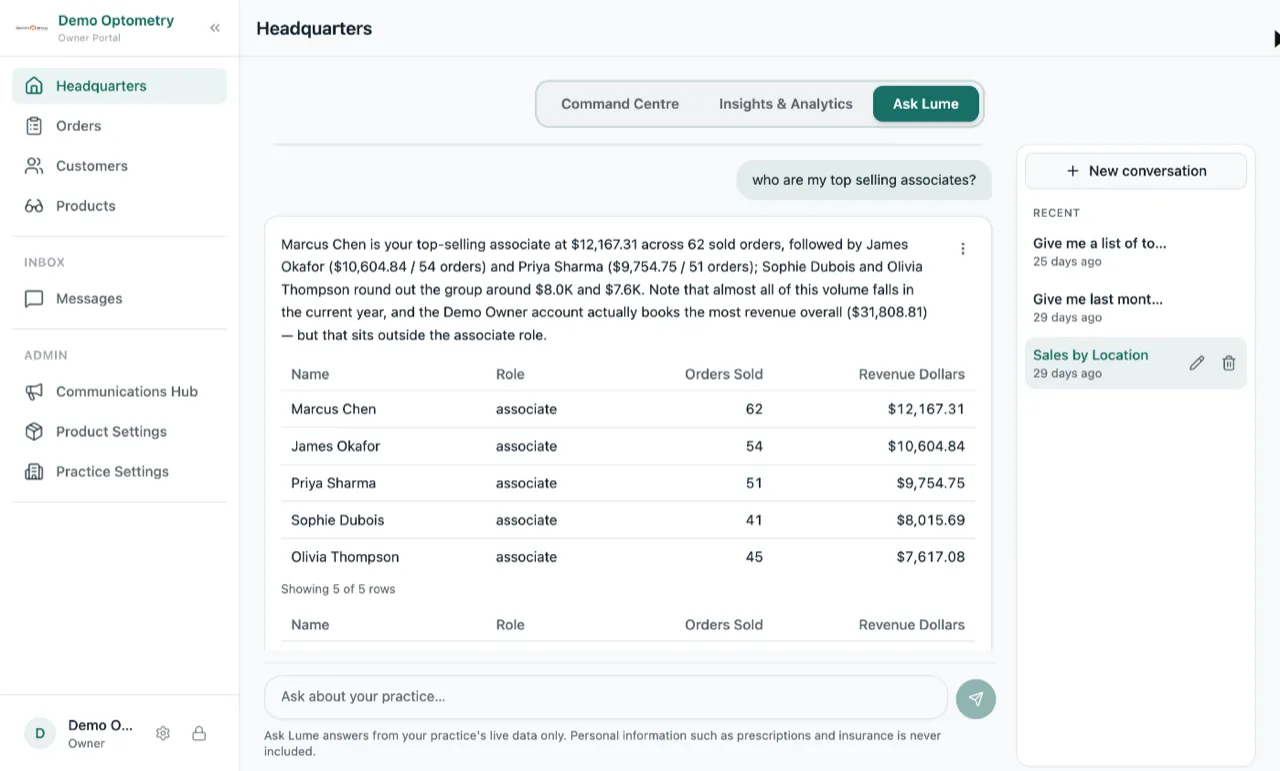
The AI reads your practice’s data and answers in plain words. When a table or a chart says it better, you get one, and you can save it to Excel, PDF or as a picture. Your questions are saved so you can come back to them later.
Ask Lume only sees your practice’s data, and only owners and managers can use it.
Ask Lume is in beta. If you want to play around with it, ask us and we will turn it on for you.
See every brand you sold
Top Brands shows your top ten. There is now a Show all button under it that lists every brand you sold in that period. Tap a brand to see which products sold.
Multi-pair as a percentage
The Multi-pair column in Top Sellers now shows the percentage next to the count, like 3 (25%). That makes it easier to compare two sellers with different sales volumes.
Tidier Period Report
The Sold number now sits on top, with Quoted, Collected and Outstanding in a row under it. No more empty space at the bottom of the card.