Put your own colours and logo on your invoices
Invoices can now use your colours, your logo, your footer message and your terms. Also: the customer's age on their profile, small frames that fit the B measurement, and old orders that still save after you retire a lens option.
Make the invoice look like yours
Go to Practice Settings and open Invoice Settings. Pick your two colours. Choose whether to show your logo and your business name. Write a footer message, and choose whether to print your phone and fax number. Add your terms and conditions, which print on the customer’s copy only.
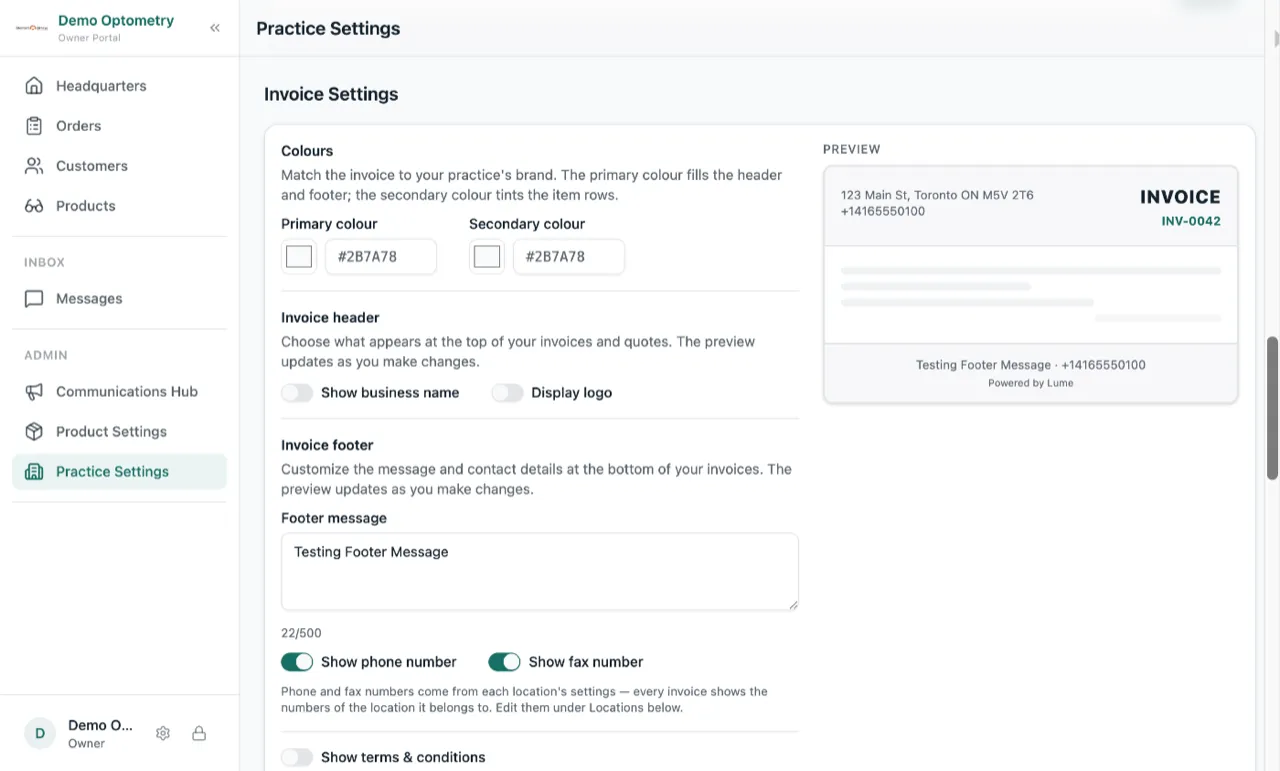
A preview sits next to the settings and updates as you change things, so you see the invoice before you save. Press Save once and every invoice, quote and order screen uses the new look.
Leave the colours blank and your invoices stay exactly as they are today. Invoices you already sent keep the terms they were sold with, even if you change the terms later.
See the customer’s age
The customer profile now shows the date of birth and the age next to it. Handy for progressive lenses, a minor, or an insurance cutoff. If you typed the wrong date, you can now clear it.
Small frames fit the B measurement
The B measurement only accepted 30 to 80. Kids’ frames, rimless and half-eye frames are often smaller, and Lume left the box empty and refused the real number. It now goes down to 15.
Old orders still save after you retire a lens option
If you turned off a lens type, tint or add-on, every old order that used it stopped saving. Those orders save again now. You still cannot pick a retired option for a new line.