Discount just the frame, or just the lenses
A discount can now go on the frame, the lenses, the tint or an add-on on its own. Saved orders keep the frame's size and colour code. And items you turn off stay out of search.
Discount just one part of a line
Before, a discount on a line covered everything on it: the frame, the lenses, the tint and the add-ons. So 50% off a $379 frame also took 50% off the lenses. Not what you meant.
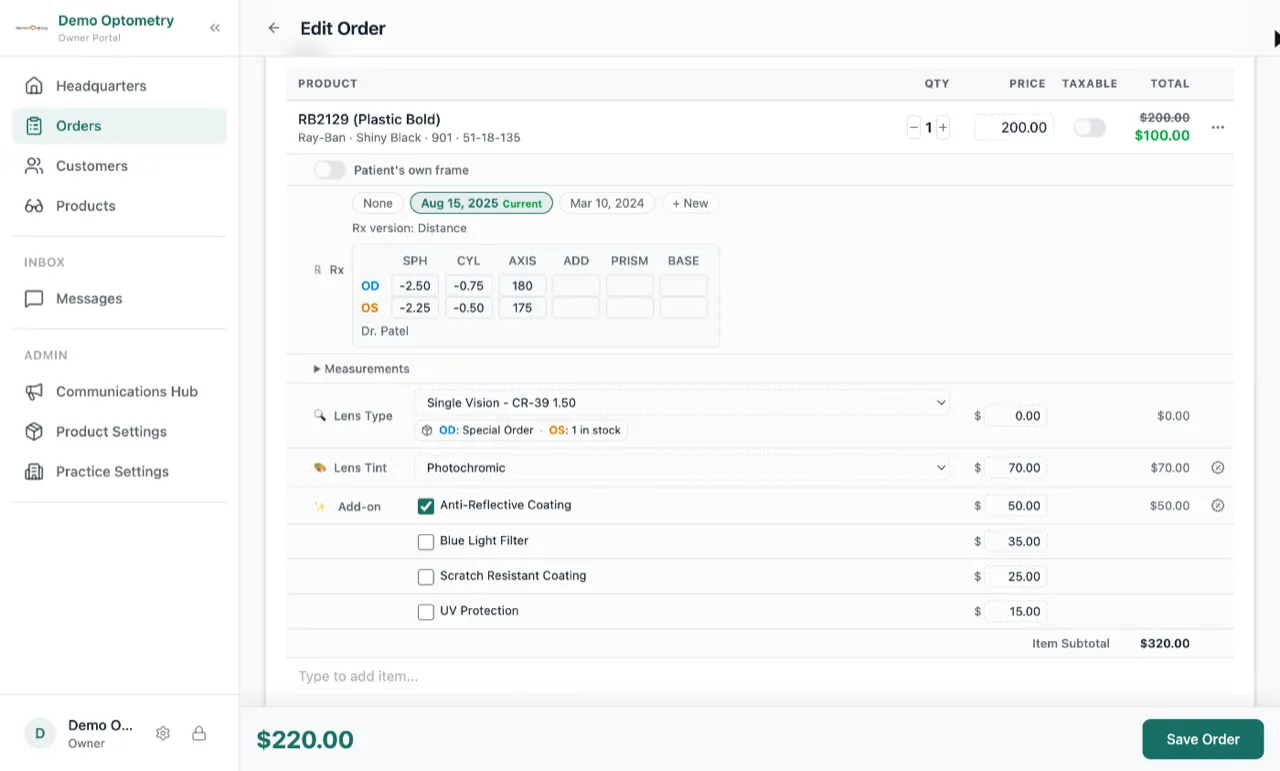
Now each part has its own Add discount button. Discount the frame alone, the lenses alone, or one add-on. Each discount shows on its own line on the order, on the invoice and in the change history, so you can see exactly what was taken off what.
Orders you saved before this keep their old discount until you remove it.
Saved orders keep the frame’s size and colour code
When you picked a frame, Lume showed the brand, colour, colour code and size. After you saved, the code and the size disappeared from the order and the invoice. They stay now.
Also, if you typed a price before picking a frame from the catalogue, Lume replaced it with the catalogue price. It now keeps the price you typed.
Items you turn off stay hidden
If you turned off a product, a category or a brand, it still showed up in search, in the frame picker and on a barcode scan. It does not any more. You can still open the item’s page and turn it back on.