Dates in your own words, and Top Sellers counted by unit
Date fields read ordinary phrasing and offer month and year dropdowns, the date on a recorded payment can now be corrected, and Top Sellers counts units with the orders behind every number.
Three updates this week.
Write the date the way you would say it
Date fields already took typed entry. Now they read it the way you would say it out loud. “dec 5 1980”, “15 february 1955” and “5 déc. 1980” all land. Short forms with a period work too, and a small misspelling still finds the right month: “20 marrch 1991” reads as 20 March. Numeric dates like 05/12/1980 are read the Canadian way, day first.
When picking is faster than typing, the calendar now has month and year dropdowns, so a 1955 birth year is two taps. On a date of birth, the year list covers the hundred years a birth date falls in.
Fix the date on a payment
You could already correct a payment’s method and its amount. The date is now correctable too, so a payment keyed in on Monday can be recorded against the Saturday it was actually taken.
It works like the other corrections: open a recorded payment, change what needs changing, and it lands in Change History with who made it, when, and the before and after.
Top Sellers counts units
Headquarters now opens on Insights & Analytics, showing month to date. Command Centre is one tap away.
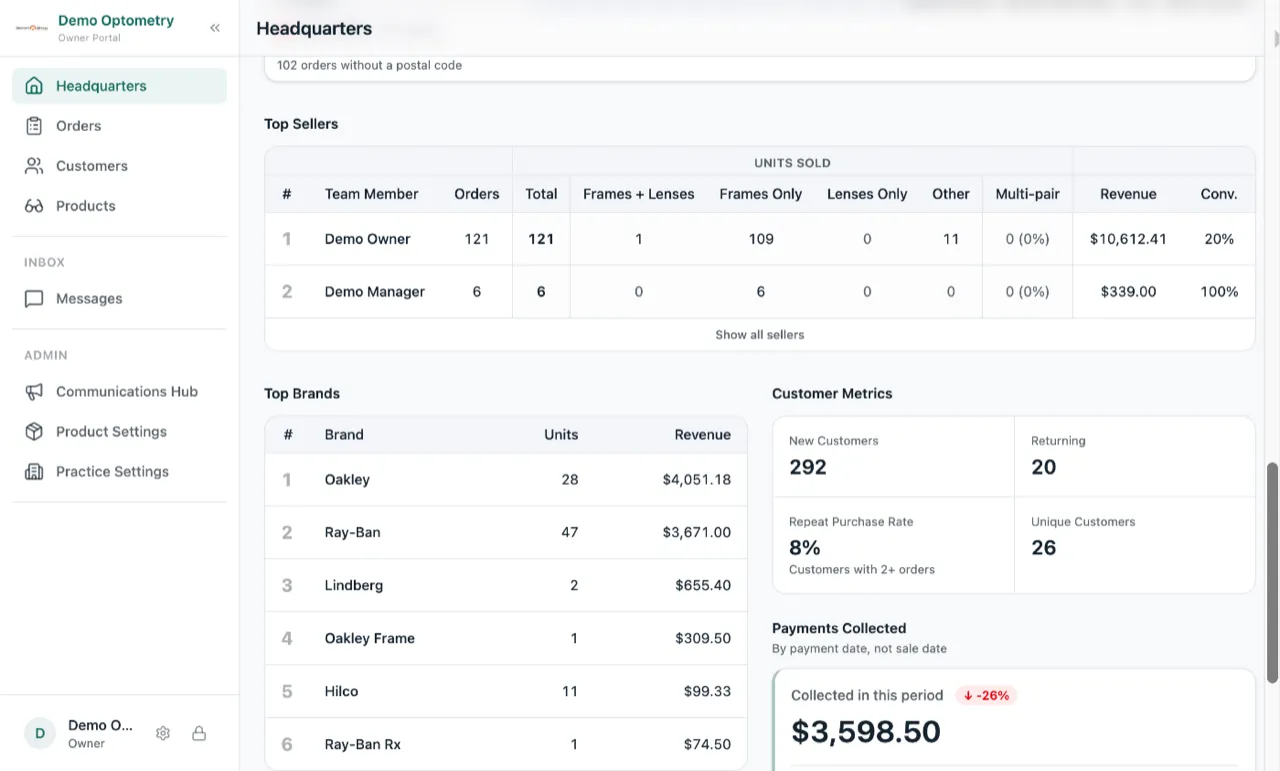
Top Sellers is built around units, which is what commission is usually paid on. A frame counts as a unit, and so do a frame with lenses, lenses on their own, and other products. The table shows all four next to the total:
Units Sold · Frames + Lenses · Frames Only · Lenses Only · Other
Every number is tappable. Tap one and you get the orders behind it: each order, each unit, what it was made of and what it came to. The totals add up to the figure you tapped, so a commission conversation has something you can check line by line.