Insurance cards, line discounts, and dates you can correct
A customer can now carry more than one active insurance card, a discount can sit on a single line of an order, and both the sale date and a recorded payment can be corrected after the fact.
Three updates landed together this week. Here’s what changed and what it means at the counter.
Every insurance card a customer actually has
A household often carries one plan per spouse, and a child is usually covered by both. Lume only kept one card current, so adding the second one pushed the first into history. Now a customer can hold as many active cards as they really have, and all of them show on the profile.
Each card carries the full set of details, including the holder’s date of birth. That last one is doing real work: Lume uses the birthday rule to work out which plan gets billed first, and badges the cards Claim 1 and Claim 2 so the order is on the profile instead of in someone’s head. A card that has passed its expiry date stays visible with an Expired badge rather than quietly disappearing.
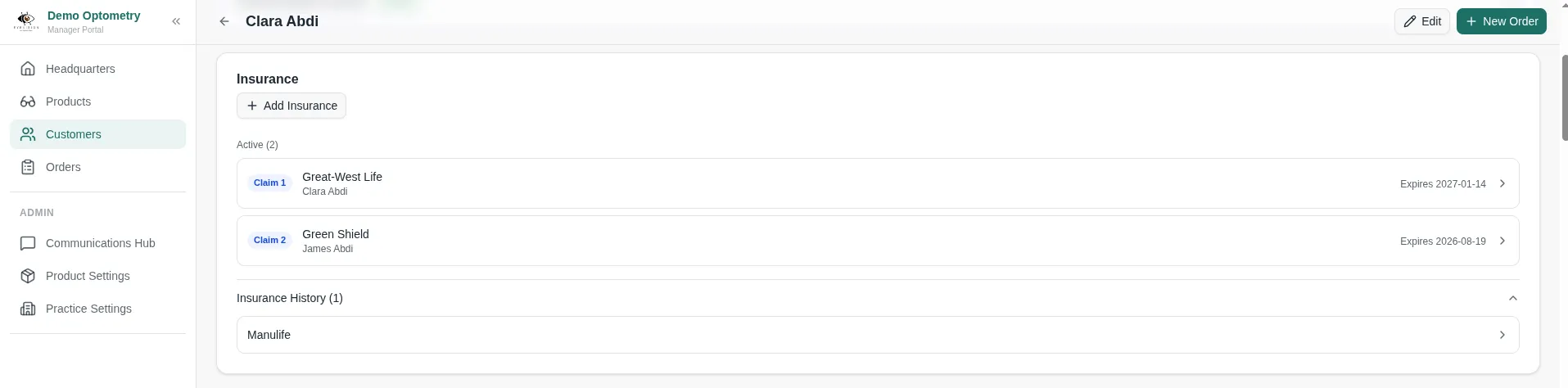
You can open any card to see it in full, edit it, or move it to history. Anything in history can be restored, and every one of those changes is recorded in the activity log. Two fields were also relabelled after practices told us insurers print them interchangeably: group number is now Plan/Group Number, and member ID is now Member ID/Certificate Number.
Benefits reset on their own schedule
A policy expiry date and the day benefits reset are two different dates, and it’s the second one that decides when a customer can buy glasses again. Cards now carry a benefits reset date alongside the expiry, set 24 months out from the effective date by default, with an interval you can change per card.
There’s a new default campaign to go with it, Benefits Refresh Reminder, which reaches out ahead of the reset. It sits beside the existing Insurance Renewal Reminder, which fires before the card itself expires. The Insurance Renewal Reminder copy has been corrected too, since it described benefits that had already renewed when it was really firing ahead of expiry.
Put a discount on one line
Order-level discounts haven’t changed. What’s new is a manual discount on a single line, with your own label, available both in the order builder and on the order detail page. It prints on quotes and invoices the same way.
The reason to reach for it is tax. A discount spread across the whole order moves the tax base on every line, including the ones you never meant to discount. A line discount is netted against that line before tax is calculated, so a break on a frame leaves the tax on the lenses alone.
Correct the sale date
The sale clock used to start when an order was keyed in. Practices take orders on paper when the floor is busy and enter them a few days later, which booked the revenue to the day of data entry and printed that day on the invoice.
Confirmed orders now show the sale date in the invoice header with a pencil beside it. Click it, pick the real day, and add a note if the reason is worth keeping. Any staff member can do it, you can go back as far as you need, and future dates aren’t offered. Invoices print the sale date, and the correction shows up in Change History as a sentence naming both days.
Quote dates are editable the same way, and the modal there carries an auto-confirm this order option that creates the order, confirms it, and dates the sale in one motion. The New Order page also takes an optional sale date while you’re keying the order in, which saves opening it again afterward. Leave it blank and nothing about saving an order changes.
Correct a payment, not just its method
You could already fix a payment recorded with the wrong method. Now the amount is correctable too, on payments and refunds alike, so $500 keyed as $50 no longer has to be patched with a second payment that never happened.
Lume rechecks the limits as it saves: a payment can’t exceed what the order still owes, a refund can’t exceed what was collected, and a payment can’t drop below the refunds already taken against it. The direction of a row stays fixed. A refund recorded as a payment is two events to unwind, not a typo to overwrite.